/**
* Functions and filters related to the menus.
*
* Makes the default WordPress navigation use an HTML structure similar
* to the Navigation block.
*
* @link https://make.wordpress.org/themes/2020/07/06/printing-navigation-block-html-from-a-legacy-menu-in-themes/
*
* @package WordPress
* @subpackage Twenty_Twenty_One
* @since Twenty Twenty-One 1.0
*/
/**
* Add a button to top-level menu items that has sub-menus.
* An icon is added using CSS depending on the value of aria-expanded.
*
* @since Twenty Twenty-One 1.0
*
* @param string $output Nav menu item start element.
* @param object $item Nav menu item.
* @param int $depth Depth.
* @param object $args Nav menu args.
* @return string Nav menu item start element.
*/
function twenty_twenty_one_add_sub_menu_toggle( $output, $item, $depth, $args ) {
if ( 0 === $depth && in_array( 'menu-item-has-children', $item->classes, true ) ) {
// Add toggle button.
$output .= '';
}
return $output;
}
add_filter( 'walker_nav_menu_start_el', 'twenty_twenty_one_add_sub_menu_toggle', 10, 4 );
/**
* Detects the social network from a URL and returns the SVG code for its icon.
*
* @since Twenty Twenty-One 1.0
*
* @param string $uri Social link.
* @param int $size The icon size in pixels.
* @return string
*/
function twenty_twenty_one_get_social_link_svg( $uri, $size = 24 ) {
return Twenty_Twenty_One_SVG_Icons::get_social_link_svg( $uri, $size );
}
/**
* Displays SVG icons in the footer navigation.
*
* @since Twenty Twenty-One 1.0
*
* @param string $item_output The menu item's starting HTML output.
* @param WP_Post $item Menu item data object.
* @param int $depth Depth of the menu. Used for padding.
* @param stdClass $args An object of wp_nav_menu() arguments.
* @return string The menu item output with social icon.
*/
function twenty_twenty_one_nav_menu_social_icons( $item_output, $item, $depth, $args ) {
// Change SVG icon inside social links menu if there is supported URL.
if ( 'footer' === $args->theme_location ) {
$svg = twenty_twenty_one_get_social_link_svg( $item->url, 24 );
if ( ! empty( $svg ) ) {
$item_output = str_replace( $args->link_before, $svg, $item_output );
}
}
return $item_output;
}
add_filter( 'walker_nav_menu_start_el', 'twenty_twenty_one_nav_menu_social_icons', 10, 4 );
/**
* Filters the arguments for a single nav menu item.
*
* @since Twenty Twenty-One 1.0
*
* @param stdClass $args An object of wp_nav_menu() arguments.
* @param WP_Post $item Menu item data object.
* @param int $depth Depth of menu item. Used for padding.
* @return stdClass
*/
function twenty_twenty_one_add_menu_description_args( $args, $item, $depth ) {
if ( '' !== $args->link_after ) {
$args->link_after = '';
}
if ( 0 === $depth && isset( $item->description ) && $item->description ) {
// The extra element is here for styling purposes: Allows the description to not be underlined on hover.
$args->link_after = '';
}
return $args;
}
add_filter( 'nav_menu_item_args', 'twenty_twenty_one_add_menu_description_args', 10, 3 );namespace Elementor;
if ( ! defined( 'ABSPATH' ) ) {
exit; // Exit if accessed directly.
}
/**
* Elementor skin base.
*
* An abstract class to register new skins for Elementor widgets. Skins allows
* you to add new templates, set custom controls and more.
*
* To register new skins for your widget use the `add_skin()` method inside the
* widget's `register_skins()` method.
*
* @since 1.0.0
* @abstract
*/
abstract class Skin_Base extends Sub_Controls_Stack {
/**
* Parent widget.
*
* Holds the parent widget of the skin. Default value is null, no parent widget.
*
* @access protected
*
* @var Widget_Base|null
*/
protected $parent = null;
/**
* Skin base constructor.
*
* Initializing the skin base class by setting parent widget and registering
* controls actions.
*
* @since 1.0.0
* @access public
* @param Widget_Base $parent
*/
public function __construct( Widget_Base $parent ) {
parent::__construct( $parent );
$this->_register_controls_actions();
}
/**
* Render skin.
*
* Generates the final HTML on the frontend.
*
* @since 1.0.0
* @access public
* @abstract
*/
abstract public function render();
/**
* Render element in static mode.
*
* If not inherent will call the base render.
*/
public function render_static() {
$this->render();
}
/**
* Determine the render logic.
*/
public function render_by_mode() {
if ( Plugin::$instance->frontend->is_static_render_mode() ) {
$this->render_static();
return;
}
$this->render();
}
/**
* Register skin controls actions.
*
* Run on init and used to register new skins to be injected to the widget.
* This method is used to register new actions that specify the location of
* the skin in the widget.
*
* Example usage:
* `add_action( 'elementor/element/{widget_id}/{section_id}/before_section_end', [ $this, 'register_controls' ] );`
*
* @since 1.0.0
* @access protected
*/
protected function _register_controls_actions() {}
/**
* Get skin control ID.
*
* Retrieve the skin control ID. Note that skin controls have special prefix
* to distinguish them from regular controls, and from controls in other
* skins.
*
* @since 1.0.0
* @access protected
*
* @param string $control_base_id Control base ID.
*
* @return string Control ID.
*/
protected function get_control_id( $control_base_id ) {
$skin_id = str_replace( '-', '_', $this->get_id() );
return $skin_id . '_' . $control_base_id;
}
/**
* Get skin settings.
*
* Retrieve all the skin settings or, when requested, a specific setting.
*
* @since 1.0.0
* @TODO: rename to get_setting() and create backward compatibility.
*
* @access public
*
* @param string $control_base_id Control base ID.
*
* @return mixed
*/
public function get_instance_value( $control_base_id ) {
$control_id = $this->get_control_id( $control_base_id );
return $this->parent->get_settings( $control_id );
}
/**
* Start skin controls section.
*
* Used to add a new section of controls to the skin.
*
* @since 1.3.0
* @access public
*
* @param string $id Section ID.
* @param array $args Section arguments.
*/
public function start_controls_section( $id, $args = [] ) {
$args['condition']['_skin'] = $this->get_id();
parent::start_controls_section( $id, $args );
}
/**
* Add new skin control.
*
* Register a single control to the allow the user to set/update skin data.
*
* @param string $id Control ID.
* @param array $args Control arguments.
* @param array $options
*
* @return bool True if skin added, False otherwise.
* @since 3.0.0 New `$options` parameter added.
* @access public
*
*/
public function add_control( $id, $args = [], $options = [] ) {
$args['condition']['_skin'] = $this->get_id();
return parent::add_control( $id, $args, $options );
}
/**
* Update skin control.
*
* Change the value of an existing skin control.
*
* @since 1.3.0
* @since 1.8.1 New `$options` parameter added.
*
* @access public
*
* @param string $id Control ID.
* @param array $args Control arguments. Only the new fields you want to update.
* @param array $options Optional. Some additional options.
*/
public function update_control( $id, $args, array $options = [] ) {
$args['condition']['_skin'] = $this->get_id();
parent::update_control( $id, $args, $options );
}
/**
* Add new responsive skin control.
*
* Register a set of controls to allow editing based on user screen size.
*
* @param string $id Responsive control ID.
* @param array $args Responsive control arguments.
* @param array $options
*
* @since 1.0.5
* @access public
*
*/
public function add_responsive_control( $id, $args, $options = [] ) {
$args['condition']['_skin'] = $this->get_id();
parent::add_responsive_control( $id, $args );
}
/**
* Start skin controls tab.
*
* Used to add a new tab inside a group of tabs.
*
* @since 1.5.0
* @access public
*
* @param string $id Control ID.
* @param array $args Control arguments.
*/
public function start_controls_tab( $id, $args ) {
$args['condition']['_skin'] = $this->get_id();
parent::start_controls_tab( $id, $args );
}
/**
* Start skin controls tabs.
*
* Used to add a new set of tabs inside a section.
*
* @since 1.5.0
* @access public
*
* @param string $id Control ID.
*/
public function start_controls_tabs( $id ) {
$args['condition']['_skin'] = $this->get_id();
parent::start_controls_tabs( $id );
}
/**
* Add new group control.
*
* Register a set of related controls grouped together as a single unified
* control.
*
* @param string $group_name Group control name.
* @param array $args Group control arguments. Default is an empty array.
* @param array $options
*
* @since 1.0.0
* @access public
*
*/
final public function add_group_control( $group_name, $args = [], $options = [] ) {
$args['condition']['_skin'] = $this->get_id();
parent::add_group_control( $group_name, $args );
}
/**
* Set parent widget.
*
* Used to define the parent widget of the skin.
*
* @since 1.0.0
* @access public
*
* @param Widget_Base $parent Parent widget.
*/
public function set_parent( $parent ) {
$this->parent = $parent;
}
}
Getting started with Lizaro Casino is a breeze – the registration process is quick and easy, and once you’ve created an account, you can access the casino through the Lizaro casino login section on the website. Managing your login credentials is a cinch, too, thanks to the account dashboard, where you can keep all your login information in one place. If you have any questions or need further guidance, Lizaro’s comprehensive FAQ section and dedicated support team are always on hand to help.
Lizaro Casino boasts an impressive selection of games from top software providers, including slots, table games, and live dealer options. The website’s seamless user interface makes it a joy to navigate and find your favorite games. With a search function and categorization by game type, you can quickly track down the games that suit your tastes. And with a mobile app, you can take the casino experience on the go, whenever and wherever you want.
At Lizaro Casino, player security and well-being are top priority. The casino is licensed by the UK Gambling Commission and uses robust encryption to safeguard player data, giving you peace of mind when you’re playing online. Lizaro also takes responsible gaming seriously, with measures in place to promote healthy gaming habits, including deposit limits, reality checks, and self-exclusion options. If you’re concerned about responsible gaming, the Lizaro website has plenty of valuable resources and support to help you stay in control.
With its wide range of games, user-friendly interface, and commitment to player security and well-being, Lizaro Casino is definitely worth considering in the UK online gambling scene. Of course, like any casino, it has its pros and cons – the lack of a dedicated VIP program might be a drawback for high rollers, for example. But on the other hand, the casino’s comprehensive support and responsible gaming measures are notable strengths. If you’re looking for a reliable and engaging online casino experience, Lizaro is certainly worth exploring. For more information on Lizaro, you can visit Alice and the Hair.
]]>For more information, visit Lizaro Casino.
Users often face difficulties with logging in to their Lizaro Casino accounts, which can be frustrating and time-consuming. This section will examine the common concerns and potential solutions for Lizaro casino login issues.
Several users have reported issues with entering their credentials due to unclear login requirements. Some users also report difficulties remembering their login details, which can lead to further frustration. This section will discuss the possible reasons behind these issues.
Unclear Login Requirements: Users may struggle to enter their login credentials due to unclear instructions or formatting issues. Forgot Login Details: Users may forget their login details, leading to difficulties accessing their accounts.
Fortunately, there are several solutions to resolve common login issues associated with Lizaro Casino.
Reset Password: Users can try resetting their passwords to resolve any issues with login credentials. Clear Cache and Cookies: Clearing cache and cookies can resolve problems with login details.
Some users experience technical issues while accessing the Lizaro Casino platform, which can be alarming. This section will examine the common technical problems and potential solutions.
Users may encounter various errors, such as server down or slow loading times. This section will provide explanations for these technical issues and potential fixes.
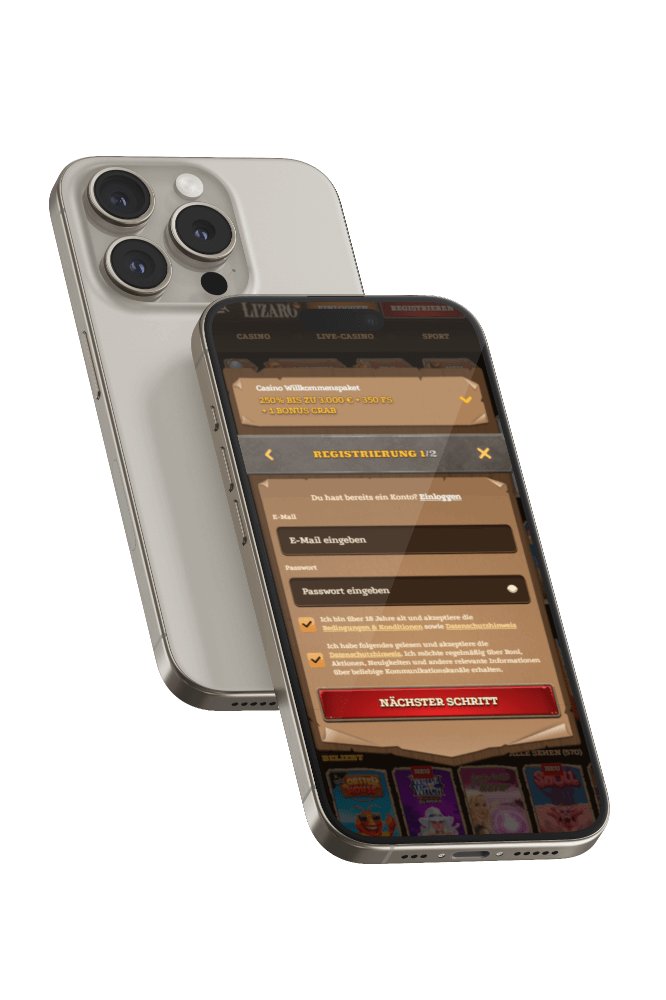
Lizaro online casino offers a variety of games, including slots, table games, and live dealer games. However, users may have concerns about game fairness and transparency. This section will explore the fairness and transparency of games offered by Lizaro Casino.
Users can find a wide range of games at Lizaro Casino, with varying Return to Player (RTP) and volatility levels.
Game Selection: Lizaro Casino offers a variety of games, including slots, table games, and live dealer games. RTP and Volatility: Users can find games with high RTP and low volatility, or those with lower RTP and higher volatility.
Users may be concerned about the banking and payment options available at Lizaro Casino. This section will examine the available payment methods and potential fees.
Users can deposit and withdraw using various payment methods, such as credit cards and e-wallets. This section will discuss the withdrawal times and potential fees associated with each payment method.
Lizaro Casino offers a reliable platform for UK players, but users should be aware of the potential issues associated with login and technical problems. By understanding the common concerns and solutions, users can make informed decisions about their gaming experience.
Users often face difficulties with logging in to their accounts due to technical issues, account restrictions, or incorrect login credentials.
Our review highlights both the benefits and drawbacks of using Lizaro Casino, allowing you to decide if it’s a suitable option for your gaming needs.